Using Baseboard
Insights
Baseboard checks your connected platforms for you and puts what matters on the Overview, most urgent first.
What the Insights card shows
The Insights card sits right below the KPI tiles on the Overview tab. It shows the most urgent insights first, with a short sentence and the numbers behind it. Use the button at the bottom of the card to see the rest, and the arrow on a row to open the details.
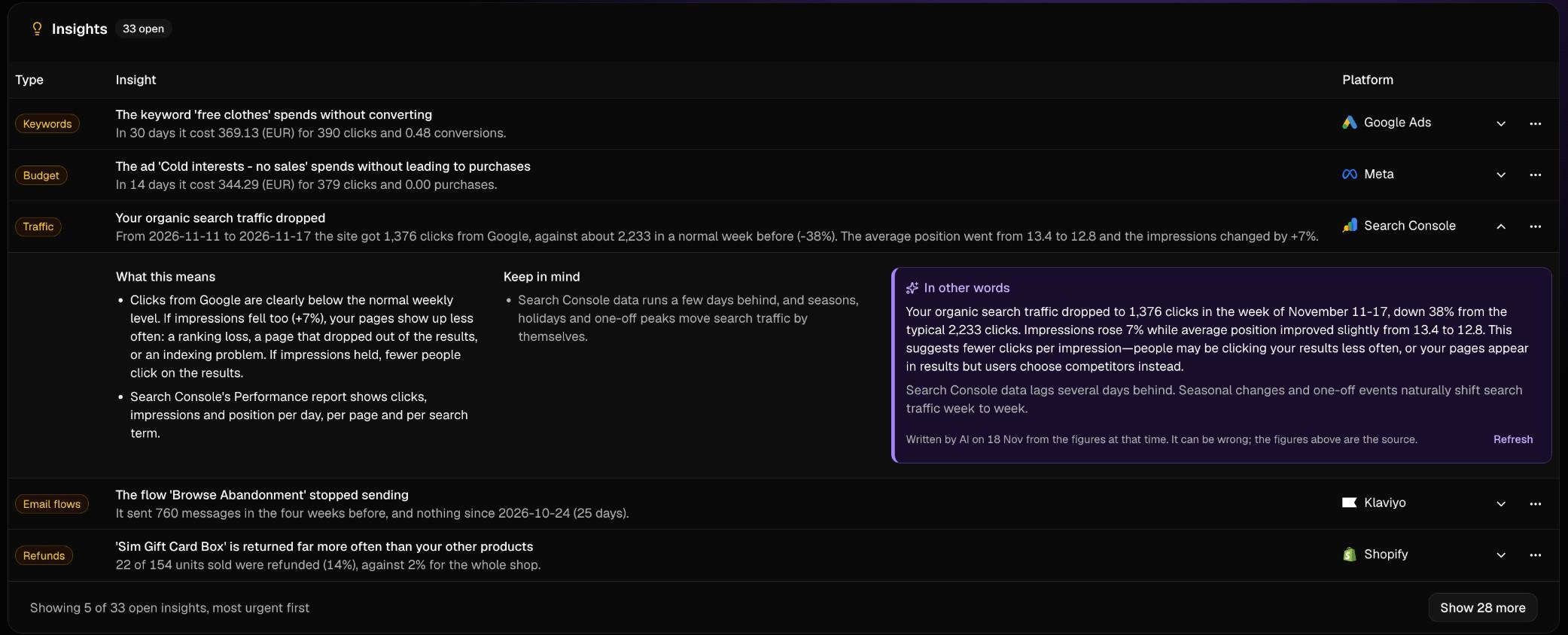
Three kinds of insights
- Problem: something is going wrong or wasting money, for example a keyword or search term that spends without converting, ads that stopped delivering, or email campaigns with many bounces or spam complaints.
- Measurement gap: your numbers may be incomplete, for example conversion tracking that stopped or auto-tagging that is switched off.
- Opportunity: something is working and could grow, for example a campaign worth scaling, a search query that is rising or a page that ranks just below page one.
Which platforms are checked
Insights come from the platforms you have connected: Google Ads, Meta, TikTok, Shopify, Klaviyo, Google Search Console, Google Analytics 4 and Microsoft Clarity. The checks run automatically after your data has synced, so you do not have to set anything up. A platform you have not connected simply gives no insights.
Hiding and restoring insights
Use the menu on a row to hide an insight you do not want to see. You can bring hidden insights back at any time.
Missing something or something unclear? Email us at contact@baseboard.cloud.